Getting Started

Join Voice
Hop into any voice channel. The bot joins you automatically when you run a command.
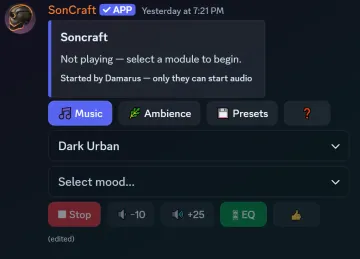
Type /play
The dashboard appears in chat. Pick a mood — music starts streaming to everyone.
1. Add Soncraft to your server
Section titled “1. Add Soncraft to your server”Go to soncraftaudio.com and click Add to Discord. You need the Manage Server permission in the server you want to add it to.
The invite asks for voice and messaging permissions automatically. No manual role setup is needed.
2. Join a voice channel
Section titled “2. Join a voice channel”Join any voice channel in your server. Soncraft joins your channel on its own when you start music — but it needs you to be in one first.
3. Type /play
Section titled “3. Type /play”In any text channel, type /play and press enter. The Soncraft dashboard appears. From there:
- Pick a module — a music pack, like Classic Fantasy
- Pick a mood — the feel you want for your story
- That’s it — Soncraft joins your voice channel and the music starts
The first play of a module can take up to a minute while the audio gets ready. After that, it starts fast.
Your players don’t need to install anything. They hear the music like any other person talking in the channel.